Choosing 1080p does not automatically enlarge menus and table labels. The video may contain more pixels while the text still occupies the same small fraction of the picture. Browser chrome, desktop margins, and a recipient's small preview can make it harder to read.
On September 30, 2026, we recorded one test document for about eight seconds in each of six tab, window, and entire-screen conditions. These are actual outputs from Toolit's recorder in one Windows Chrome setup, not a ranking of every browser or device.
Check the captured area and text size before changing resolution
Check both actual output dimensions and the size at which the recipient will play the file.
A tab can devote more of the recording to one web page than a browser window or entire desktop.
Text legible in the original file may become hard to read in a small chat or document preview.
Text cropped from the actual recordings
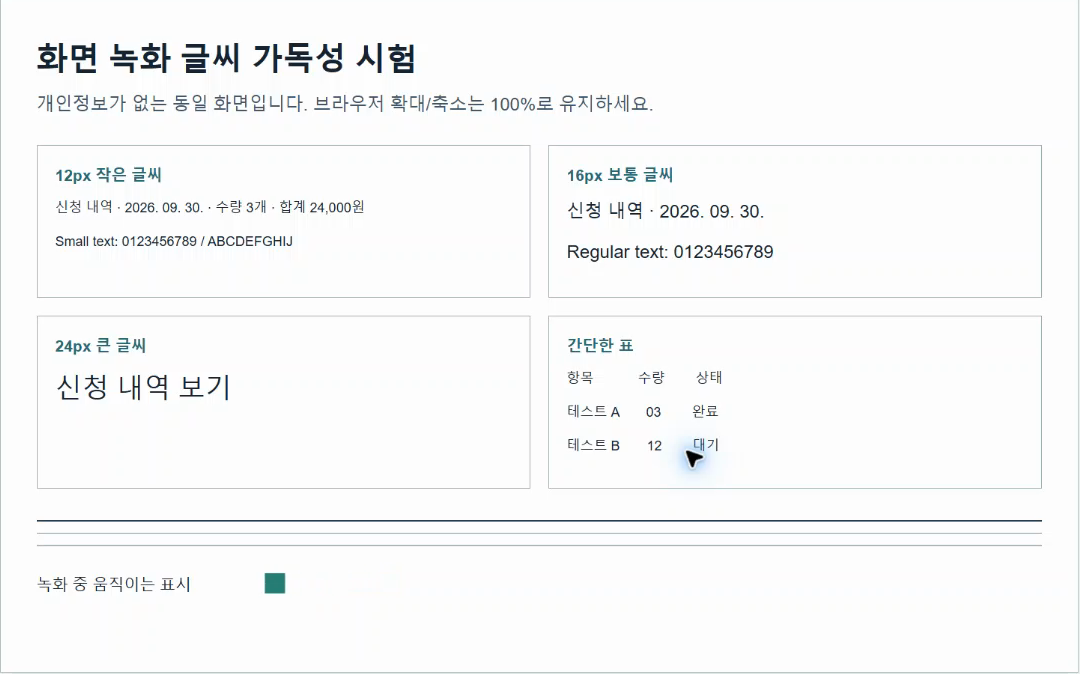
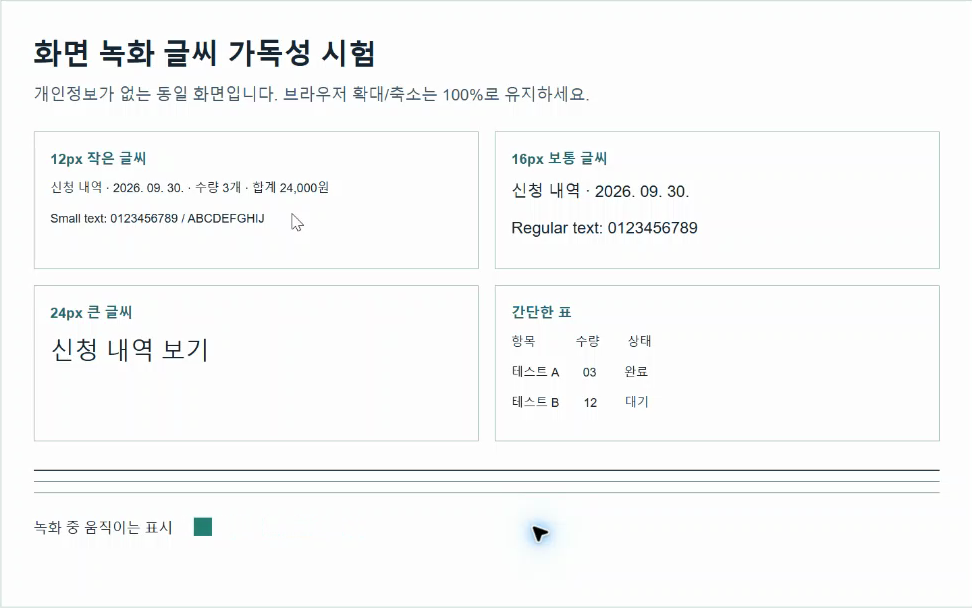
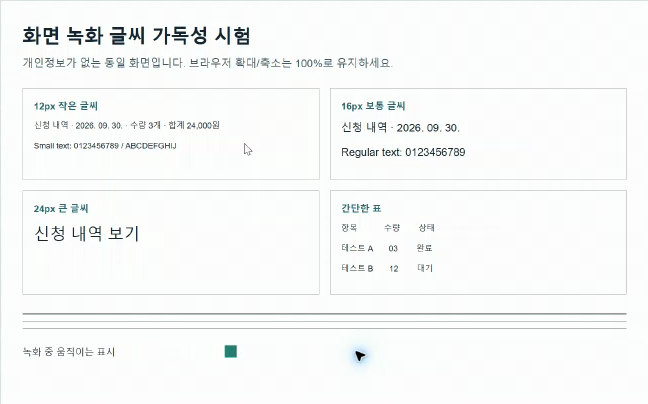
We recovered three September 30 originals: tab 1080p and entire-screen 1080p/720p. Each image below is a crop of the test document from the frame at two seconds.
No sharpening, upscaling or enhancement was applied. Open each image at native size; responsive previews can hide differences. Browser tabs, address bar and desktop were excluded.
The earlier table covers six conditions, but these images show only the three recovered originals. Compare the same text region to see which strokes remain distinguishable.
Requested size and saved video size were not identical
All three 1080p requests reported a 1920×1080 input track, but the saved videos were 1920×882 for the tab, 1808×1080 for the window, and 1728×1080 for the entire screen. The three 720p files also differed in shape. A resolution choice expresses a preferred capture size; it does not promise identical final width and height for every sharing surface.
| Surface | Request | Input track | Saved video | Eight-second file |
|---|---|---|---|---|
| Tab | 720p | 1280×720 | 1280×588 | 86,360B |
| Tab | 1080p | 1920×1080 | 1920×882 | 162,399B |
| Window | 720p | 1280×720 | 1206×720 | 111,030B |
| Window | 1080p | 1920×1080 | 1808×1080 | 249,160B |
| Entire screen | 720p | 1280×720 | 1152×720 | 171,462B |
| Entire screen | 1080p | 1920×1080 | 1728×1080 | 272,337B |
Why the same document appeared smaller in a window or full-screen clip
The tab clip centered on web-page content. The window clip also contained Chrome's tabs and address bar; the entire-screen clip included more surroundings. The document therefore occupied a smaller portion of the video in the latter two. This is about what was included in the frame, not only its pixel count.
For a single website tutorial, try capturing its tab first. Use a window for an installed app and the entire screen only when movement between apps matters. Prepare notifications and private content before capturing the entire screen.
Where 1080p helps—and where it cannot
For the same surface, the 1080p file in this test had more horizontal and vertical pixels than the 720p file. That can preserve more detail when played at its native size or on a sufficiently large display. It does not make a tiny document occupy more of the picture, and a small chat preview may shrink it again.
File bytes rose from 86,360 to 162,399 for the tab, 111,030 to 249,160 for the window, and 171,462 to 272,337 for the entire screen. Content, motion, and encoder behavior affect those sizes. They are neither picture-quality scores nor general file-size predictions for games or lectures.
A practical order for fixing unreadable text
Change one cause at a time rather than repeatedly switching the resolution menu.
| Symptom | Try first | Check |
|---|---|---|
| Document small with large surrounding margins | Capture only the needed tab or window | How much of the frame contains the document |
| 12px labels tiny even in the original file | Enlarge the window or adjust page zoom | Whether menus still fit on screen |
| Readable original, blurry in messenger | Open the file instead of a tiny inline player | Actual recipient playback size |
| 720p insufficient but framing is good | Test 1080p with the same surface and zoom | Saved dimensions and readable labels |
| Text smears or shimmers in motion | Play a ten-second file at native size | Whether the artifact also appears in another player |
- Read related articleTen-second work-demo recording checklist
Three checks before a real recording, and the limits of this test
Check that only the necessary area is in frame, that labels are readable at the recipient's viewing size, and that a downloaded trial has the expected dimensions and format. Do not judge solely from the recorder's live preview.
This is one Windows PC, one Chrome setup, one simple test page, and one run per condition. We did not score character recognition, compression quality, or perceived sharpness, nor control for other monitors, OS scaling, and browsers. A first entire-screen selection of the wrong monitor was excluded; incorrect surface selections for another condition were rejected before recording. MP4 on this setup does not mean every browser saves MP4.
Test conditions and reproduction
We recorded the same 12px, 16px, and 24px text for eight seconds each
- 1
A local, non-sensitive test page contained 12px, 16px, and 24px labels, a small numeric table, thin lines, and a moving marker. Browser zoom remained at 100%. Screen audio, microphone, and webcam were off. We used Toolit's actual screen-recording path.
- 2
The user selected the tab, window, or entire screen in Chrome's sharing picker. We verified the selected surface and captured each at requested 720p and 1080p once. We separately recorded the browser-reported input track size, saved MP4 dimensions, duration, and bytes. Incorrect surface selections were not recorded or were excluded.
- 3
We checked that the test page appeared in each retained clip. We did not measure optical character recognition accuracy or human reading speed at the video's native pixel size. The numbers below are observations of dimensions and framing, not a percentage score for sharper 1080p text.
Raw reproducibility records (JSON)
The main results are explained above. These raw records contain processing conditions and file hashes. Opening a link displays JSON text, not an illustrated article.
Official documentation used for this analysis
Give the content more of the frame, then check the saved file
In this test, requested 1080p did not produce the same saved dimensions across sharing surfaces, and window or entire-screen capture included more area outside the document. For one web page, begin with a tab, improve window and text size, and only then compare 720p with 1080p.
Judge the downloaded result by whether labels remain readable in the recipient's app and viewing size, not by the resolution button alone.